
Slow System or Limited Storage? The Ultimate SSD and NVMe Upgrade Guide for Peak Performance
-
Overview
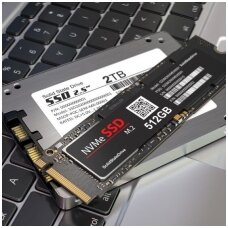
Solid-state drives (SSDs) slash operating-system boot time, shrink game-level load screens to a blink, and eliminate the spinning-disk bottlenecks that once limited laptops, desktops, and consoles. Modern PCI Express (NVMe) models reach seven-gigabyte-per-second burst speeds, while budget-minded 2.5-inch SATA drives still outpace hard disks by an order of magnitude. This guide explains every major SSD form factor, shows exactly how each improves real-world computing, and maps product grades—Service-Pack OEM, Original-Pulled, and Compatible—to the use-cases that deliver maximum value. Whether you slot a Kingston KC3000 into a gaming tower, add a WD Green to a PlayStation®5 expansion bay, or revive an aging notebook with a Crucial BX500, you’ll finish with a faster, quieter, and more reliable machine.
1 Introduction
Mechanical hard drives (HDDs) top out around 120 MB/s sequential reads, throttling modern CPUs and GPUs that can process data dozens of times faster. Even entry-level SATA III SSDs deliver roughly 500 MB/s, while PCIe 4.0 NVMe models push 7,000 MB/s—over fifty-eight times faster than an HDD baseline. These gains translate directly into productivity: operating systems boot in 10–15 seconds instead of a minute, games resume in seconds, and large media projects open without stalls.
2 SSD Technologies & Form Factors
2.1 PCIe NVMe M.2 (2230 & 2280)
- Kingston KC3000 PCIe 4.0 — peaks above 7 GB/s and carries a five-year warranty plus high endurance, making it ideal for enthusiast desktops and PlayStation®5 upgrades.
- Samsung MZVLB256HBHQ — an OEM-pulled Gen 3 drive that still reaches 3.4 GB/s at a fraction of new-retail pricing.
- Hynix HFS128G39TND-N210A — cost-effective 128 GB option for Steam-deck-style handhelds using short 2230 modules.
2.2 SATA III M.2 & 2.5-Inch
- Crucial BX500 240 GB — affordable 2.5-inch SSD rated at 540 MB/s reads / 500 MB/s writes and backed by a three-year warranty.
- WD Green M.2 540 GB — ultra-slim SATA stick that sips power, ideal for thin-and-light notebooks.
- Patriot P210 1 TB — plug-and-play SATA 3.0 drive that drops into consoles such as PlayStation 4 or older laptops lacking NVMe slots.
2.3 Adapters & Enclosures
- Transcend TS-CM42S — turns any spare M.2 SATA drive into a 10 Gb/s USB-C portable.
- MacBook Air NGFF-to-M.2 Adapter — lets 2013-2015 Apple notebooks accept modern NVMe blades, extending life without proprietary Apple pricing.
3 Performance Gains in the Real World
Switching from HDD to SATA SSD can cut Windows 11 boot time from 60 seconds to under 15. Moving again to NVMe typically halves that figure and slashes game-level loads by 30–70 %. On consoles, Microsoft confirms that Xbox Series expansion cards match the internal drive’s velocity architecture, so newly installed NVMe storage launches titles at identical speeds. Sony likewise certifies specific PCIe 4.0 M.2 SSDs for PlayStation®5, enabling players to double storage without sacrificing the console’s lightning-fast resume times.
4 Reliability, Thermals & Power
SSDs contain no spinning platters; this eliminates mechanical failure points and makes them shock-resistant—critical for laptops and handheld consoles. Typical 2.5-inch drives idle below 2 W and rarely exceed 8 W under load, improving battery life and reducing fan noise compared with 2.5-inch HDDs that can spike past 10 W. NVMe modules run hotter, so premium models ship with integrated heatsinks or rely on motherboard heat-spreaders to avoid thermal throttling.
5 Installation & Compatibility
Adding an SSD is usually a five-minute hardware job: open the chassis, insert the M.2 blade at a 30-degree angle, secure with a single screw, or slot a 2.5-inch drive into a spare bay and attach SATA data plus power leads. Clone the old disk with free imaging tools, set the new drive as the primary boot device in BIOS, and enjoy instant acceleration. Console upgrades follow similar steps—remove the side panel on PS5, fit the NVMe drive behind the metal shield, and re-assemble.
6 Quality Grades Explained
Grade Description Ideal User Service-Pack OEM (New) Factory-sealed with full TBW endurance spec Creators, power gamers Original-Pulled A/B Genuine modules pulled from low-cycle systems; bench-tested Budget rebuilds, fleet refresh Compatible Third-party drives meeting JEDEC & PCIe specs Entry PCs, bulk console refits Typical figures; check product page for exact term.
7 Use-Case Spotlights
- eSports Desktops — Kingston KC3000 slashes map-change times, shaving crucial seconds in competitive shooters.
- Video-Editing Workstations — Samsung 970 EVO Plus (analogous to MZ-JPU512T) sustains 3 GB/s writes, keeping 4K timeline scrubbing stutter-free.
- Retrofit MacBooks (2013-2015) — Adapter plus NVMe blade doubles throughput versus Apple’s stock AHCI blades.
- Xbox & PlayStation Libraries — Expansion cards and certified NVMe drives add up to 2 TB of space, critical as AAA titles swell beyond 100 GB.
- Portable Game Storage — Transcend enclosure converts any spare SATA M.2 into a 1 GB/s USB-C handheld library.
8 Environmental Impact
Because SSDs consume less power and produce less heat than HDDs, lifecycle analyses suggest energy savings over five years of continuous use can offset the higher manufacturing footprint for flash memory. However, some studies argue certain HDD models may be greener in specific datacenter workloads, highlighting the need for right-sizing storage to usage patterns.
9 Future Trends
PCIe 5.0 controllers arriving in 2025 promise sequential reads beyond 12 GB/s and random I/O leaps that will push game asset streaming toward “zero-load.” Meanwhile, QLC and upcoming PLC NAND will drive cost per gigabyte under $0.05, making multi-terabyte SSDs mainstream for consoles and laptops alike.
10 Conclusion
Ready to feel the difference? Pick the capacity and interface that matches your device—whether a 256 GB OEM-pulled Samsung for a Chromebook, a 1 TB Patriot P210 for your PlayStation 4, or a flagship Kingston KC3000 for a PCIe 4.0 desktop—add it to your cart, and follow our step-by-step installation guide. Your system will boot, launch, and multitask faster than ever before.
References
AnandTech. (2024). Realtek outlines SSD controller roadmap: High-end PCIe 5.0 x4 platform in the works.
Kingston Technology. (2023). The 5 benefits of SSDs over hard drives. https://www.kingston.com/en/blog/pc-performance/benefits-of-ssd
Lifewire. (2019). How to install an SSD in your computer. https://www.lifewire.com/how-to-install-ssd-in-computer-4691056
Network World. (2022). Are HDDs greener than SSDs? https://www.networkworld.com/article/957264
PlayStation Support. (2024). How to add an M.2 SSD to a PS5 console. https://www.playstation.com/support/hardware/ps5-install-m2-ssd
Reddit /r/buildapc. (2024). How much faster are SSDs over hard drives? https://www.reddit.com/r/buildapc/comments/1h6o7s9
Reddit /r/XboxSeriesS. (2023). Will an expansion card really make a difference on performance? https://www.reddit.com/r/XboxSeriesS/comments/1b0t7k1
SuperSSD. (2023). SSD power consumption: What to expect. https://www.superssd.com/kb/ssd-power-consumption
The Verge. (2024). Xbox Series X/S expansion cards near lowest prices for Prime Day. https://www.theverge.com/2024/10/8/24201383
Tom’s Hardware. (2021). Kingston KC3000 M.2 SSD review: The fastest flash you can get. https://www.tomshardware.com/reviews/kingston-kc3000-m2-ssd-review
Tom’s Hardware. (2018). Crucial BX500 SSD review. https://www.tomshardware.com/reviews/crucial-bx500-ssd
Transcend. (2017). TS-CM42S SSD enclosure kit review [YouTube video]. https://www.youtube.com/watch?v=-F5bXJFEhdM
YouTube. (2021). How to install an NVMe or SATA M.2 SSD in a PC. https://www.youtube.com/watch?v=fhPYpgLJKtQ
Amazon Marketplace. (2023). Sintech NGFF M.2 NVMe SSD adapter card for upgrading MacBook Air. https://www.amazon.com/dp/B07FYY3H5F
Samsung Community Forum. (2023). NVMe vs. SATA game load times discussion. https://www.reddit.com/r/techsupport/comments/12ewi12
